Secure online booking

Book train tickets
across Pakistan.

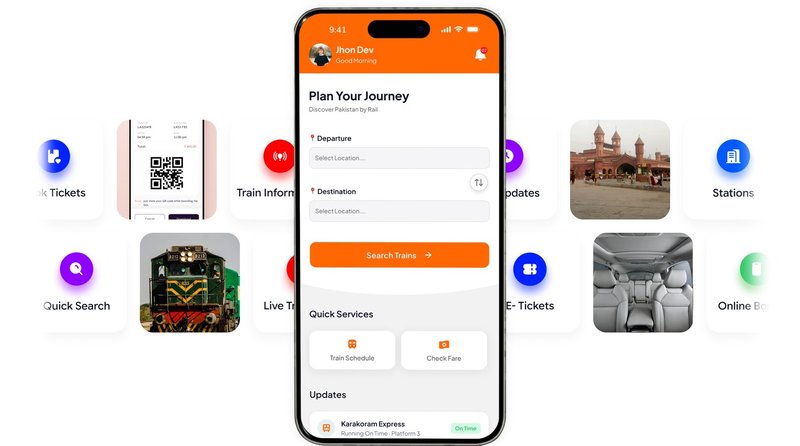
Search trains between any two stations, pick the exact seat or berth you want, pay securely in the Rail Pass app and travel with a digital ticket. No queue, no paperwork.

Live seat availability · Instant digital ticket · Refunds as per policy · Also on mobile

40+
Trains
250+
Stations
1,000+
Routes served
24/7
In-app booking
How it works

Four steps to your ticket

Booking in the Rail Pass app takes a couple of minutes. You only pay once your seat is held for you.

1

Choose your journey

Pick your boarding and destination stations, then the travel date. We show only the trains that actually run that day.

2

Pick class & seat

Compare available classes and fares, then choose your exact seat or berth from the live seating plan.

3

Pay securely

Your seat is held while you pay through the secure payment gateway. Nothing is charged until you confirm.

4

Travel

Your ticket is issued instantly with a booking reference. Show it when boarding — no printing required.

Seats are held for a limited time. Once you start checkout your chosen seats are reserved for a short window (15 minutes) so nobody else can take them. If payment isn't completed in time, the seats are released automatically.
Trains & routes

Where can you travel?

RailPass covers long-distance services on the main north–south corridor and the branch lines that connect to it.

Trains you can book

Green Line Express Tezgam Khyber Mail Pakistan Express Millat Express Jaffar Express Awam Express Karakoram Express
  • Up and down direction services, each with its own timetable
  • Seating and sleeper berth options depending on the class
  • Station-by-station arrival and departure times at booking

Popular stations

Karachi Cantt Hyderabad Rohri Sukkur Multan Cantt Lahore Faisalabad Rawalpindi Peshawar Cantt Quetta

Not seeing your station? Many smaller halts are served too — the full list of destinations for your route is available at the booking counter and in the app.

Check trains & seats in the app
Fares & classes

How fares are worked out

Your fare depends on the distance between your two stations, the class you travel in, and the passenger type. The price you see at checkout is the price you pay.

By route and class

Every station pair has a published fare for each travel class, so a shorter hop always costs less than the full run.

Passenger types

Adult, child and concession categories each have their own fare. Some categories travel free or at a reduced rate.

Booking close to departure

Tickets bought within 48 hours of departure carry a small late-booking surcharge of 5%.

Travel classes

Classes differ by comfort and layout — from seated economy through to air-conditioned sleeper berths on overnight services.

AC Sleeper AC Business AC Standard Economy

Availability varies by train. The classes offered on your specific service are shown once you pick a date.

Good to know

Currency All fares are shown and charged in Pakistani Rupees (PKR).
Rounding Final fares are rounded up to the nearest PKR 10.
Seats per booking Book up to 6 seats in a single online transaction.
Online payment range Online orders are accepted between PKR 10 and PKR 50,000.
Refunds & cancellation

Changed your plans?

Tickets can be refunded before travel. How much you get back depends on how far ahead of departure you cancel.

When you cancel You receive
48 hours or more before departure 90% of the fare
24 – 48 hours before departure 80% of the fare
Less than 24 hours before departure 70% of the fare
Up to 2 hours after scheduled departure 50% of the fare
More than 2 hours after departure No refund
Note. Non-seat tickets are refunded at the fare less a PKR 20 deduction and must be refunded at the station where they were issued. Percentages above apply to the fare paid; refunds are processed back to the original payment method.
Rail Pass mobile app

Your journey begins here

Rail Pass puts the whole journey in your pocket. Browse train routes, check schedules and book tickets across Pakistan — from Karachi, Lahore, Rawalpindi, Islamabad, Multan and Peshawar and stations in between.

Search for a train, pick your seats and passengers, pay, and your digital ticket is ready with a scannable QR code. Your trip history, notifications and profile all travel with you.

  • Search & compare — find trains between any two stations with live fares and seat availability
  • Pick seats & passengers — choose berths and add traveller details before you pay
  • Digital tickets — QR code and PDF, saved on your phone with no need to print
  • Trip history — every past and upcoming booking in one place
  • Push notifications — booking confirmations and journey reminders
  • Sign in your way — phone number OTP, Google, or carry on as a guest
Coming soon on Google Play Coming soon on the App Store

Tickets are also available at booking counters in all major stations.

Freight & parcels

Send goods by rail, station to station

Alongside passenger tickets, RailPass handles parcel and freight bookings. Drop your consignment at the booking counter and it travels on a scheduled service to the destination station for collection.

  • Every parcel is labelled and tracked individually
  • Scanned at loading and again on arrival, so nothing goes missing
  • Normal, Rush and Urgent handling priorities
  • Released only to the named receiver after verification

Freight is booked at station counters rather than online — staff will weigh your consignment and quote the charge before booking.

1

Book

Counter staff record the sender, receiver and contents, then issue a receipt with a tracking reference.

2

Load

Each parcel is scanned onto the train against a loading manifest.

3

Arrive

Parcels are scanned off at the destination and stored in the warehouse.

4

Collect

The receiver is verified at handover and signs for the consignment.

Help

Frequently asked questions

Do I need an account to book?

No. You can book as a guest — just provide passenger details and a phone number. Your booking reference is all you need to look the ticket up afterwards.

How do I get my ticket?

As soon as payment is confirmed your ticket is issued online with a booking reference. You can view it on your phone and show it when boarding; there is nothing to print.

Can I choose a specific seat or berth?

Yes. After picking your train and class you get an interactive seating plan showing exactly which seats and berths are free, and you choose from there.

How long are my seats held during checkout?

Your selected seats are locked for 15 minutes while you complete payment. If the payment is not finished in that window the seats are released for other passengers.

What payment methods are accepted?

Payment is taken through a secure hosted payment gateway, so your card or wallet details are never stored by RailPass. Online orders must total between PKR 10 and PKR 50,000.

How do I cancel and get a refund?

Refunds follow the schedule in the Refunds section above — the earlier you cancel before departure, the more you get back. Refunds are returned to the payment method you used.

Why is my fare higher than I expected?

Tickets booked within 48 hours of departure include a 5% late-booking surcharge, and all fares are rounded up to the nearest PKR 10. The full breakdown is shown before you pay.

Is there a mobile app?

Yes — Rail Pass is our mobile app for Android and iOS. It covers the whole journey: browse routes, check schedules, book seats, pay and carry your digital ticket, plus trip history and notifications. It is on the way to both app stores; until then, tickets are available at station booking counters.

Where can I book a ticket?

Through the Rail Pass mobile app, or at booking counters in all major stations. This website is for information — fares, schedules, routes and refund rules.

Can I still buy a ticket at the station?

Yes. Booking counters at stations sell the same tickets, and staff can also handle refunds and freight bookings in person.

Ready when you are

Get the Rail Pass app to check seat availability and book in a couple of minutes.